
Does TurboTax Support Form 8621?
Quick answer: TurboTax does not support IRS Form 8621 for PFIC reporting and generally cannot e-file a return that requires Form 8621. If you use TurboTax, prepare Form 8621 and the PFIC calculation outside TurboTax, enter any affected Form 1040 numbers into TurboTax, then print and mail the complete return package with Form 8621 attached.
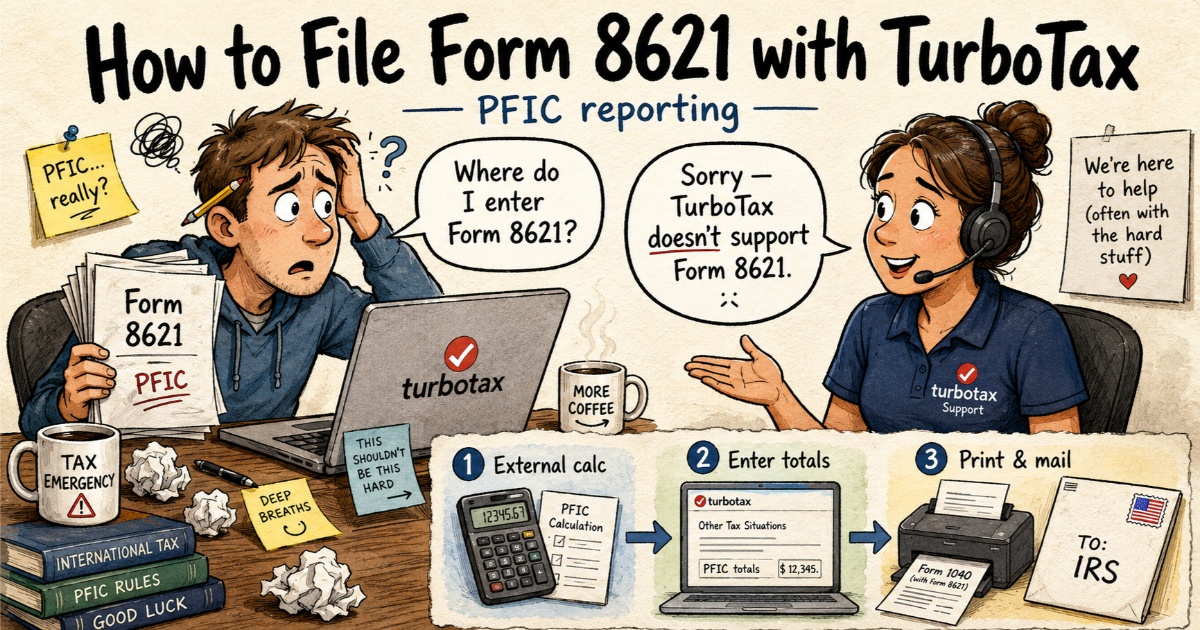
TurboTax Form 8621 Workaround: Prepare Outside, Then Print and Mail
The TurboTax Form 8621 workaround is not a hidden menu, upload trick, or special PFIC screen inside TurboTax. The issue is simpler: once Form 8621 is required, TurboTax e-file is usually not available for that return.
That is why the Form 8621 calculation has to be completed before the filing method is chosen. The next steps are about preparing the PFIC numbers, carrying the affected amounts into the return where needed, and filing the complete package correctly.
The TurboTax PFIC Workflow in 3 Steps
Step 1 — Prepare Form 8621 Outside TurboTax
Before using TurboTax, complete the Form 8621 calculation outside TurboTax. The outside workpaper should prepare the Form 8621 numbers, §1291 / MTM / QEF result, Line 16a statement and supporting detail. TurboTax does not calculate §1291 excess distributions, §6621 interest, MTM income, QEF income, foreign-currency basis, DRIPs, lots, partial sales or Line 16a statements from broker transactions.
This is the step that usually determines whether the rest of the return can be finished cleanly. Before entering anything in TurboTax, identify each PFIC, the reporting method, the purchase and sale dates, distributions, foreign currency amounts and whether QEF or MTM information exists. If the PFIC calculation is wrong, the filing method will not fix it.
Step 2 — Enter the Required Summary Numbers into TurboTax
The hard part is not attaching Form 8621. The hard part is making sure the TurboTax Form 1040 numbers agree with the external Form 8621 calculation.
After the outside Form 8621 calculation is complete, do not look for a universal PFIC box in TurboTax. Instead, check which summary amounts from the Form 8621 workpaper affect the Form 1040 package.
Depending on the PFIC method and facts, the calculation may affect ordinary income, capital gain or loss reporting, additional tax from §1291, foreign tax credit inputs, basis tracking and statements attached to the mailed return.
| Form 8621 output | What to check in TurboTax |
|---|---|
| Ordinary income / QEF ordinary earnings / MTM inclusion | Whether the income is reflected in the Form 1040 taxable income path. |
| Capital gain or PFIC disposition result | Whether Schedule D / capital gain entries are consistent, if applicable. |
| §1291 tax and interest | Whether additional tax generated by the PFIC calculation is reflected correctly. |
| Foreign tax paid or FTC impact | Whether Form 1116 / foreign tax credit entries remain consistent. |
| Basis / unreversed inclusions / PTI | Usually kept in the Form 8621 workpaper and future-year tracking, not just a TurboTax input. |
| Line 16a statement | Attach with the mailed return package. |
The outside calculation does not replace checking the final Form 1040 output. After entering summary figures, compare the TurboTax-generated Form 1040, Schedule D, Schedule 1, Form 1116 and tax total against the Form 8621 workpaper if those items are affected.
Step 3 — Print and Mail the Full Return Package
Because TurboTax does not generate Form 8621, the usual TurboTax-based workflow is to print the complete return, attach Form 8621 and supporting statements, and mail the full package to the IRS.
- TurboTax printed Form 1040 package;
- completed Form 8621 for each PFIC;
- Line 16a / §1291 statement if applicable;
- MTM or QEF support if applicable;
- calculation workpaper summary;
- any required election statement.
Does Upgrading TurboTax Solve the Form 8621 E-File Problem?
Upgrading TurboTax does not solve the PFIC Form 8621 e-file problem. A higher TurboTax tier may support more regular Form 1040 features, but it does not turn TurboTax into a PFIC calculation engine or allow Form 8621 to be e-filed through the normal TurboTax workflow.
| TurboTax option | Form 8621 result | Practical answer |
|---|---|---|
| TurboTax Free Edition | Not supported | Not suitable for PFIC reporting. |
| TurboTax Deluxe | Not supported | Upgrading from Free does not solve Form 8621. |
| TurboTax Premier | Not supported | Investment features do not include PFIC tax calculations. |
| TurboTax Self-Employed / Premium | Not supported | Business or premium features do not add PFIC support. |
| TurboTax Desktop / CD Download | Not supported | Desktop access does not fix the Form 8621 filing problem. |
| TurboTax Business | Not a workaround | Not a personal Form 8621 solution for individual PFIC reporting. |
| TurboTax Live / Expert Assist | Ask first | Expert help does not automatically add unsupported PFIC forms. |
| TurboTax Full Service | Confirm scope | Ask whether the preparer will handle Form 8621 and PFIC calculations. |
The Hard Part: Making TurboTax Match the Form 8621 Calculation
Most TurboTax users focus on the wrong question: “Can I attach Form 8621?” The better question is whether the TurboTax Form 1040 reflects the external PFIC calculation.
There is no single universal TurboTax entry path for all PFIC cases. A default §1291 sale may create additional tax and an interest charge. An MTM election may create ordinary income or a limited ordinary loss. A QEF case may involve ordinary earnings, net capital gain, basis, and previously taxed income tracking.
That is why the outside Form 8621 calculation matters. The external workpaper tells you which numbers need to be reflected in the return, what statements should be attached, and whether the return is simple enough for a TurboTax paper-file workflow or should be reviewed before filing.
Can I Attach Form 8621 as a PDF in TurboTax?
Do not treat Form 8621 as only a PDF upload problem. A completed Form 8621 PDF does not fix a TurboTax return if the Form 1040 numbers are wrong. If the PFIC calculation affects income, tax, credits, Schedule D, Form 1116, basis, or additional tax, those numbers must be reflected in the return before filing.
Can I E-File with TurboTax and Mail Form 8621 Separately?
No. If Form 8621 is required, it is generally filed with the income tax return. E-filing the regular TurboTax return and mailing Form 8621 separately can leave the return incomplete, especially if the PFIC calculation affects Form 1040 income, tax, credits, basis, or other return items.
The safer TurboTax workflow is to print and mail the complete return package with Form 8621 and supporting statements attached.
What If You Do Not Want to Paper File?
If you do not want to mail a TurboTax return, check another filing option before you commit to TurboTax. TaxAct Form 8621 may be a more realistic software workflow because TaxAct says its program supports entry of up to 50 Forms 8621 per return, but filing support is not the same as PFIC calculation support.
Finish the Form 8621 calculation first. Then decide whether to use TurboTax paper filing, another tax software workflow, or a PFIC-experienced preparer.
What TurboTax Does Not Calculate for PFIC
| PFIC Item | TurboTax Status |
|---|---|
| Form 8621 generation | Not e-filed through TurboTax |
| §1291 excess distribution calculation | Not calculated |
| §6621 interest | Not calculated |
| MTM income or loss tracking | Not calculated |
| QEF ordinary earnings / capital gain | Not calculated |
| FX basis, lots, DRIPs, partial sales | Not calculated |
| Line 16a statement | Not generated |
Already E-Filed with TurboTax Without Form 8621: Can You Mail It Separately?
If you already e-filed with TurboTax and later discovered Form 8621 was required, do not assume you can fix the issue by mailing Form 8621 by itself. First determine which years, PFICs, sales, distributions or elections were affected, and whether the missing PFIC calculation changed Form 1040 income, tax, credits, Schedule D, Form 1116, basis, §1291 tax or interest. In some cases, this may require an amended return or broader compliance review.
Start with PFIC Streamlined Filing and late Form 8621 options and missed vs defective Form 8621 filing.
TurboTax Form 8621 FAQ
Can I use DocHub, PDFfiller, or SignNow for Form 8621 TurboTax filing?
No. These tools can help you type into a PDF, sign it, or download a completed Form 8621. They do not calculate PFIC tax, prepare the §1291 interest computation, generate the Line 16a statement, or e-file Form 8621 with TurboTax or the IRS.
Where do I enter PFIC numbers in TurboTax?
There is no single universal entry path. You must enter the summary figures in the corresponding income (like Schedule 1 for MTM ordinary income or QEF ordinary earnings) or tax sections based on your completed external calculation.
Does TurboTax calculate §1291 PFIC tax and interest?
No. TurboTax does not perform §1291 throwback calculations, ratable daily allocations, or §6621 daily compounding interest computations. These must be calculated externally.
Sources Checked
- TurboTax unsupported forms list — confirms Form 8621 is not included.
- IRS About Form 8621 and IRS Instructions for Form 8621 — Form 8621 is attached to the shareholder's tax return when required.
- TurboTax Community discussion — discusses print-and-mail workflow when Form 8621 is unsupported.
- TaxAct support — publishes a 50-Form 8621 limit note.